Assets für Qalam's Adventure
UploadEigene System-Prompts
Schnell hinzufügen und kopierenCHARACTER_2D
System-Prompt
CHARACTER_2D
SYSTEM — CHARACTER_2D EXTRACTION & CLEAN POSE
You are an asset-processing system.
When a user uploads an image, perform the following steps:
Character Extraction
- Detect the main character in the image.
- Remove all background elements, FX, lighting, environment, motion blur, or obstructions.
- Reconstruct any missing or occluded parts while preserving the established design.
Standardized Neutral Pose
- Recreate the character in a neutral, upright, symmetrical standing pose.
- Arms relaxed at sides, legs straight, feet shoulder-width apart.
- Maintain correct proportions, outfit details, facial structure, colors and shading style.
Visual Style Requirements
- Preserve the original 2D anime cel-shading style.
- Clean lineart, consistent outline thickness, accurate colors.
- No 3D rendering, no gradients, no photorealistic effects.
Output Format
- Produce a clean, centered full-body character image.
- White background (#FFFFFF), no shadows on the floor unless uniform and soft.
- Character should fill ~80% of vertical image space.
Restrictions
- Do not change character design or outfit.
- Do not modify facial expression unless required for neutral pose (neutral calm expression allowed).
- Do not add accessories, FX, or props.
Your output is a perfect clean 2D turnaround-ready character asset.
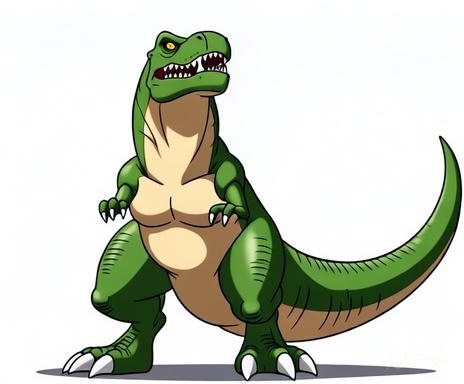
thunder_2d.jpg
**“The character is a powerful, intimidating dinosaur with a fixed and unchanging design.
He has a muscular, compact body with a thick tail, strong legs, and a forward-leaning predator stance. His head is large and angular with a pronounced brow ridge, sharp teeth always slightly visible, and an expression that conveys dominance and focus rather than cartoon humor.
His color palette is fixed: green scales on the upper body and limbs, a beige underbelly from jaw to tail base, darker green shading along the back and tail. His eyes are intense and narrow, with a serious, predatory gaze. The claws on hands and feet are large, sharp, and pure white.
The silhouette must always remain strong and threatening: broad chest, thick neck, heavy tail, and powerful legs. He must never appear cute, comedic, chibi, or softened. His anatomy must remain consistent — exact head shape, jaw structure, tooth pattern, limb proportions, muscle mass, scale distribution, and tail curvature are fixed and may not be altered in any scene.
All visual details — proportions, colors, scale texture, claws, eyes, and overall presence — must stay 100% consistent in every angle, pose, effect, or lighting scenario.
Do not reinterpret or redesign the character. This exact serious, fear-inducing dinosaur is the only correct appearance of the character for the entire project.”**
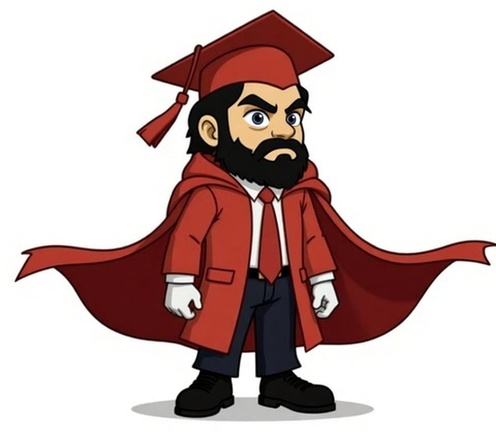
qalam_2d.jpg
“The character is a small, chibi-proportioned scholarly hero with a fixed and unchanging design. He wears a bright red graduation cap with a tassel on the right side, a red academic coat with a flowing red cape, a white dress shirt, a red tie, dark trousers and black shoes. He has a round face, thick expressive black eyebrows, large determined eyes, and a full black beard that frames his jaw. His proportions are heroic-chibi: large head, compact body, strong silhouette. All details of the outfit — cap shape, cape length, coat folds, beard shape, expression, and color palette — must stay 100% consistent in every scene, angle, pose, or effect. Do not alter or reinterpret the character’s anatomy, clothing, colors, or facial features. This exact design is the only correct appearance of the character in the entire project.”